
Mastering Claude for Design
Module 1 · Claude as a Design Tool · Lesson 1 of 1
What Claude Can Do in Interface Design, and What It Can't
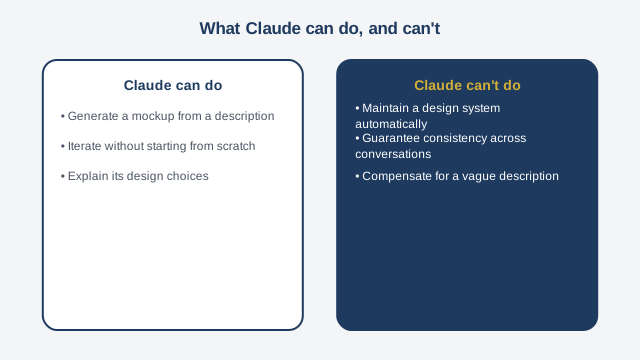
Welcome to "Mastering Claude for Design." Before you generate your first mockup, let's set a solid foundation: understanding exactly what Claude can do in interface design, and just as importantly, what it cannot do. That clarity will save you a lot of frustration in the modules ahead. Claude is the AI — Artificial Intelligence — assistant built by a company called Anthropic. What makes it especially useful for design is its ability to generate what are called "artifacts": complete web pages, with their structure, colors, and layout, straight from a plain-language description. You don't need to know how to draw. You don't need to know how to code. You describe what you want, and Claude produces an interface you can see and evolve right inside the conversation. Concretely, what can Claude do? Three main things. First, generate a mockup from a description: a homepage, a form, a dashboard. Second, iterate: you can ask for a specific change, like swapping a color or moving a block, and Claude updates the mockup without starting over. Third, explain its choices: if you ask why it placed an element in a particular spot, Claude can justify the decision, which helps you sharpen your next request. Now, what Claude cannot do — and this matters just as much. First, it doesn't automatically maintain a complex design system. A design system is a consistent set of visual rules — colors, typography, spacing — applied identically across an entire product. Claude can apply a style guide you give it, but it doesn't retain one automatically from one conversation to the next, and two screens generated separately can drift slightly apart. Second, Claude doesn't guarantee automatic consistency across multiple screens generated in different conversations — we'll cover that in more depth in the final module. Third, the quality of what you get depends directly on the quality of your description. A vague sentence produces a generic mockup. A precise description produces a usable one. That's exactly what we'll practice today: writing an effective description. A good description for Claude generally contains four elements. First, context: who is this interface for, and in what industry. Second, content: what information needs to appear, what text, what categories. Third, structure: what sections, in what order, with what visual hierarchy. And fourth, intended use: what should the person using this interface be able to do first. Take an example. If you simply write "make me a homepage for my shop," you'll get something generic, probably a standard online-store template with no real connection to your actual business. If instead you write: "I sell handwoven baskets made in Cayenne. My homepage needs to present three product categories, a banner with a photo of the workshop, and a clear call-to-action button to order via WhatsApp," you give Claude everything it needs to produce a relevant mockup on the first attempt. That's exactly what you're going to practice in the exercise that follows.
Free preview, no account needed — the rest of this module and the following modules unlock after enrolling.
Convinced? Enroll to unlock the full course.
See pricing