
Full Stack Development in the AI Era
Module 1 · Architecture of a Modern Full-Stack Application · Lesson 1 of 1
Architecture of a Modern Full-Stack Application
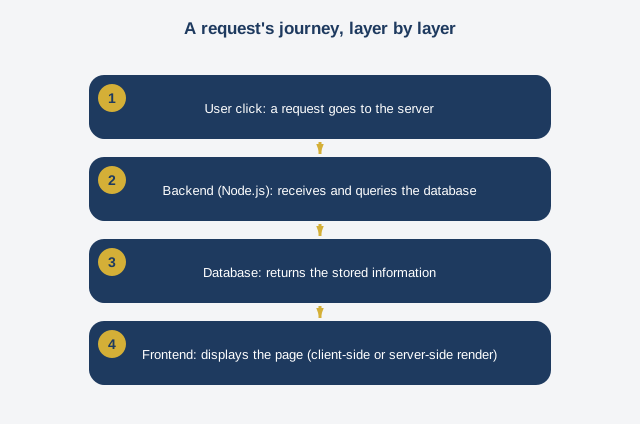
Welcome to the first module of Full Stack Development in the AI Era. Before writing a single line of code, we're going to learn how to see. See an application as a set of layers that talk to each other. This is the most underrated skill among beginner developers: being able to sketch, on paper or a whiteboard, the path a simple request takes, from a user's click all the way to a row saved in a database. Let's take a concrete example. You open an online store on your phone. You tap on a product. What exactly happens? First, your browser or app sends a request. That's a message that basically says: give me the information for product number so-and-so. This message travels over the internet and reaches a server. That server runs what we call the backend. The word backend refers to the invisible part of the application, the part running on a remote computer, not on the user's screen. The backend receives the request, figures out what's being asked, and goes and fetches the information from a database. The database is where all the durable information of the application is stored in an organized way: products, customers, orders. We'll come back to this in detail in module four. Once the information is found, the backend sends it back to the browser in a structured form. And that's where the frontend comes in, the visible part of the application, the part the user sees and interacts with. The frontend receives the data and turns it into a nice page, with an image, a price, an "add to cart" button. So, three main layers: frontend, backend, database. In this program, we're going to add a fourth, cross-cutting layer: the artificial intelligence layer, or AI. We'll cover later how a call to a language model fits into this circuit, usually on the backend side, for security reasons we'll detail in module five. Now, an essential question comes up as soon as you design an application: where does the page rendering actually happen? There are two main families of answers. The first is called client-side rendering. The browser downloads an almost-empty JavaScript application at first, and then that application, once loaded in the user's browser, fetches the data and builds the page locally. It's fast once loaded, but the very first load can be slow, because a lot of code has to download before anything shows on screen. The second is called server-side rendering. The server builds the complete page, with its content, before even sending it to the browser. The user sees something appear much faster, which matters enormously when the internet connection is slow or unstable. This is the approach Next.js enables, a framework built on top of React, which we'll use throughout this program. Why does this choice matter so much for us specifically? Because throughout the program we're going to build a fictional application called Sika Mode. Sika Mode is an online store selling pagne-fabric clothing, based in Kigali, with local delivery. Its customers sometimes connect over an unreliable mobile connection. If the app takes ten seconds to show the first screen, a good chunk of visitors will leave before ever seeing the catalog. So the architecture choice isn't an abstract technical detail: it has a direct impact on the business's revenue. There's another structural choice too: do you completely separate the frontend and backend, as two independent projects communicating through an application programming interface, or do you build a single project that does both, what we call a monolith? For a small application like Sika Mode, a well-organized monolith, like the one Next.js enables with its built-in server routes, is more than enough, and much simpler to deploy and maintain than an architecture split into several separate services. Save more complex architectures for real needs, not for anticipation. We'll come back to this principle, which we call avoiding over-engineering, in the domain pitfalls section at the end of the program. To close this module, keep this simple method, to apply to every new project before writing code: sketch the layers, sketch the data flow between them, identify where rendering happens, and ask yourself how much complexity is truly necessary given the project's real constraints, especially your end users' connectivity constraints.
Free preview, no account needed — the rest of this module and the following modules unlock after enrolling.
Convinced? Enroll to unlock the full course.
See pricing