
Media Digitalization & Streaming (Audio/Video Architecture)
Module 1 · Module 1 — Overview of a professional streaming infrastructure · Lesson 1 of 1
Overview of a professional streaming infrastructure
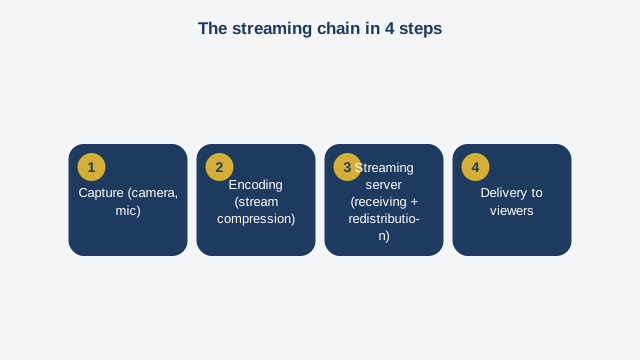
When you watch a live football match on a TV channel's app, or listen live to a local radio station on its website, a full technical chain kicks into gear between the camera and your phone. This module gives you the complete map of that chain, before we dive, module by module, into each of its building blocks. A professional streaming infrastructure rests on four major stages, always in the same order. The first stage is capture. A camera, a microphone, or an audio-video mixer produces a raw feed. This feed is usually too heavy to send as-is over the internet — one minute of raw video can weigh several hundred megabytes. The second stage is encoding. Dedicated software or hardware compresses this raw feed into a much lighter format, while keeping acceptable picture and sound quality. This is the stage that turns a feed impossible to transport over a normal network into a broadcastable one. We'll come back to this in detail in module six, alongside the production software. The third stage is sending the feed to a streaming server. The encoded feed is pushed, over the internet, to a central server whose job is to receive it and then redistribute it. It works like a telephone switchboard: one input, but the potential for thousands of simultaneous outputs. Without this intermediary server, every viewer would need to connect directly to the camera — which would collapse any standard internet connection by the tenth connected viewer. The fourth stage is delivery to viewers. The streaming server converts the received feed into a format suited for large-scale playback, then distributes it to every connected viewer, whether they're watching from a browser, a mobile app, or a smart TV. Keep this four-stage chain in mind: capture, encoding, server distribution, viewer delivery. Every module in this course goes deeper into one or more of these stages. One point deserves emphasis right away: the fragility of this chain. A professional streaming infrastructure is only as reliable as each of its links. Badly tuned encoding produces choppy video. An undersized server collapses right when the audience grows — often at the worst possible moment, mid-broadcast. An unstable internet connection at the capture point cuts the feed at the source. That's why professional stations invest so heavily in redundancy: a backup internet connection, a second server ready to take over, a technical team monitoring the live feed continuously. Let's ground this theory with a concrete example. A regional TV station broadcasting its evening news live on its website needs, at minimum: a production control room that mixes cameras and encodes the final feed, a stable fiber internet connection with a four-G backup link, a streaming server hosted in a reliable data center, and a mechanism that automatically adapts video quality to each viewer's connection — a viewer with good fiber gets a high-definition picture, a viewer on a weaker mobile connection automatically gets a lower-quality but smooth picture, with no buffering. That's exactly the architecture, piece by piece, you'll build yourself over the coming modules: first understand the protocols that carry the feed, then set up your own streaming server with Docker, manage multiple broadcast channels, troubleshoot common failures, master production tools, secure the whole system, and finally assemble everything into a complete hands-on case. A streaming infrastructure isn't a fixed object. It's a living system you monitor, adjust, and improve broadcast after broadcast.
Free preview, no account needed — the rest of this module and the following modules unlock after enrolling.
Convinced? Enroll to unlock the full course.
See pricing